
I got a report from a customer who was having problems opening an Excel spreadsheet in Office Web Apps. They were getting the following error:

When I tried to download it and open it on my desktop in Excel, I got this error:

After that, I’d just sit there with the Excel client open but everything was greyed out. I was thinking that there might not be any way to recover the file, as it was last updated too far back. But fortunately, I poked around the Ribbon bar and found the following option:
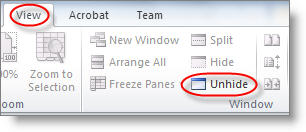
When I clicked that, everything showed up! Whoo-hoo!
This link actually talks about the underlying reason as to why it happened, but I was more interested in mitigating the damage (which Unhide did just fine).
http://fendy-huang.blogspot.com/2011/02/unable-to-open-excel-workbook-as-it.html
 SharePoint Duffbert
Thanks for the tip! Just had this happen to me and had no idea what was going on.